Posts

I recently moved a few web sites I own/run off of Netlify, onto a VPS I rent in the cloud. I did that so I could better control how my sites get published on the web. I learned recently that Netlify use Amazon Web Services (AWS) in the background and I was unhappy to learn that. With my new VPS, that is not happening. Now that I run my sites on my own (rented) server, I realized I could do something I never could before - analyze my web traffic.
Anyone who has run a web site knows that it’s tough making improvements to the site if you don’t know anything about your visitors. Even though I don’t sell anything on my sites, I wanted to know some basic things about my visitors: how many there are, how many are bots and web crawlers versus real people, where they come from, which pages on my sites they are most interested in.
I firmly believe in people’s privacy when browsing the web and so I didn’t go with what most people use: Google Analytics (GA). Google does offer their service free of charge to web site owners, and they do offer a LOT of really helpful stats in the GA reports, but that comes at the cost of a huge loss of privacy for a site’s visitors. If most people knew how much data Goog has on them, I think they would be freaked out (like I am, already). IMO, Google’s privacy policy is scary, and long and so complicated, normal humans will never be able to make sense of it. So I’ve known for a long time that I will never use their service - and nobody else should either.
So I started looking around for alternatives which would still allow me to get my basic stats about my site’s visitors, without violating people’s privacy. I checked out a number of self-hosted apps but I didn’t like most of them. For the most part, web analytics tools work by either adding a bit of JavaScript to your web pages, which calls the analytics tool on every page load in a browser, so the tracking app can log the visit, or they add a 1-pixel image to each page, for the same purpose. But those options aren’t OK with me, since then anyone who cares about their privacy would be suspicious of me and my motives.
I kept looking around though, and I think I found a really fine solution – GoAccess. I didn’t have to add anything to the pages on my sites, so there’s still no tracking being done client-side, but now I can see how many visitors each site gets, where they come from and more.
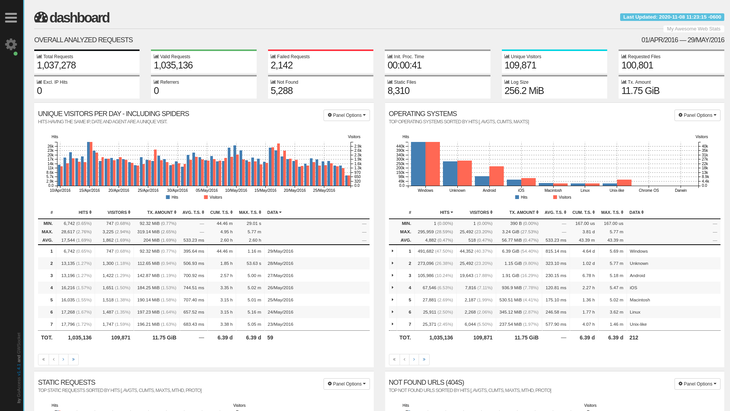
GoAccess works differently than most web analytics software available today. It reads the logs which are already on the web server. It finds out what it can from those logs, and then it generates one of two types of reports - a text-only version you can display in a terminal (a TUI!) or an HTML report you can open in a web browser (like the example pic above - credit to GoAccess.io by the way).
My favorite thing about this solution is that I can now tweak what gets logged by my web server, Caddy, so I only get critical details into the logs, and then that’s all I can see in the GoAccess reports. This way, I can protect my visitors’ privacy and still get some basic facts about them at the same time. Each time any of us visits a web page, our browsers tell the web server a few things – those are the details being logged on my site now. I still don’t know your name, your real/specific location, or anything else like that though, to be clear.
Here then is the step-by-step setup process I followed, for the techs who might be interested in doing this too. Note - I already had my web sites running from a single VPS server, with Caddy, and I control all of that, so it was easy for me to tweak, to install and configure GoAccess, just as I needed. YMMV, as we say. :)
-
Remote into the server via SSH. (You have to be able to do this or you won’t be able to follow the rest of these steps)
-
You can install GoAccess to run in docker, but I decided it would be simpler to just download and run it directly on my linux server, with these commands:
wget -O - https://deb.goaccess.io/gnugpg.key | gpg --dearmor | sudo tee /usr/share/keyrings/goaccess.gpg >/dev/null
echo "deb [signed-by=/usr/share/keyrings/goaccess.gpg arch=$(dpkg --print-architecture)] https://deb.goaccess.io/ $(lsb_release -cs) main" | sudo tee /etc/apt/sources.list.d/goaccess.list
sudo apt-get update
sudo apt-get install goaccess
- The first command gets a PGP Key from the GoAccess server and stores it in my server’s keyring.
- The second command tells linux to trust that key and adds the GoAccess server to the list of sites my server will poll when I do “apt update”.
- The third command updates the apt database from all of my allowed sites (now including the GoAccess site)
- The last command installs GoAccess.
That’s it, now I can run GoAccess whenever I choose. It’s not a service running in the background, taking up precious CPU cycles on my server.
To run GoAccess right now, and get a report in my terminal, just tell it where your log files are and what format they have. So on my server, that would be like this:
goaccess /var/log/caddy/access.log --log-format=CADDY
With that command, GoAccess will look in the correct logs folder on my server and to assume the file there is in the standard Caddy format. And voila! It works and you can move around in that report on the screen with your keyboard and explore the details. This would be great and enough for my needs, really, but why stop there since GoAccess also provides a HTML (i.e. nicer looking) report. To get that, you just add a “-o” parameter and tell it where to place the report file, like this:
goaccess -o /var/www/caddy/stats.html /var/log/caddy/access.log --log-format=CADDY
Boom - you get a single HTML file with all the same details as you saw from the terminal, but now you can open that HTML file in a browser and enjoy a nice, readable report, based on the log file. And that page has lots of options, including themes, different views you can select from and more.
With just this much, you should able to run GoAccess and get useful reports from it. Except, in my case, I now have also taken a few more steps, to make this more useful to me:
- I tweaked my Caddyfile a bit for each site, so it would know what I want to include in the logs it generates.
- I set up cron jobs for each of my sites so the server will auto-run GoAccess for me and generate that HTML report once per hour.
- Those HTML files are saved into special folders, which I can now access, using Caddy to serve them up - with Basic Auth protecting the file’s access.
- I bookmarked the URLs to those files, so now I can pull up the latest logs for each site whenever I need, to see what’s going on.
And right away, I learned I was missing files on some of my sites: robots.txt (to tell web crawlers what they should not crawl) and a fav.ico (or favicon.ico) as the site’s browser bar icon. I am working on that now, and would never have known these files were missing if not for these logs. I also learned there are people requesting the index.xml file from my sites, which is the RSS feed, which made me really happy. (RSS rules, in case you didn’t know!)
Side note: I learned about how to do all of this from this page on Edouard Paris’ web, so thanks Edouard! (His approach is different from mine, after he generates the HTML reports but that’s part of the fun!)
I hope others might find this useful and might want to ditch Goog’s service for something like GoAccess after reading this. Comments on my approach and questions are always welcome, via the Comments box below.
Till next time! :)